The Idiot gets a VPN Account Pseudonymously
How to sign up for a VPN service without handing over your credit card or real email address.
Privacy. It’s all the rage now. Let’s see if we can get a little more of it.
I’m a fan of a properly configured VPN — emphasis on properly configured. Encrypting your traffic is one of the basic things you can do to keep your data safe, especially on public Wi-Fi. While rolling your own VPN is my personal preference, some people would rather pay a provider and call it done.
As of this writing (January 2018), you could get a VPN account from Private Internet Access without surrendering your credit card or email address. It just takes a little extra work.
The Setup
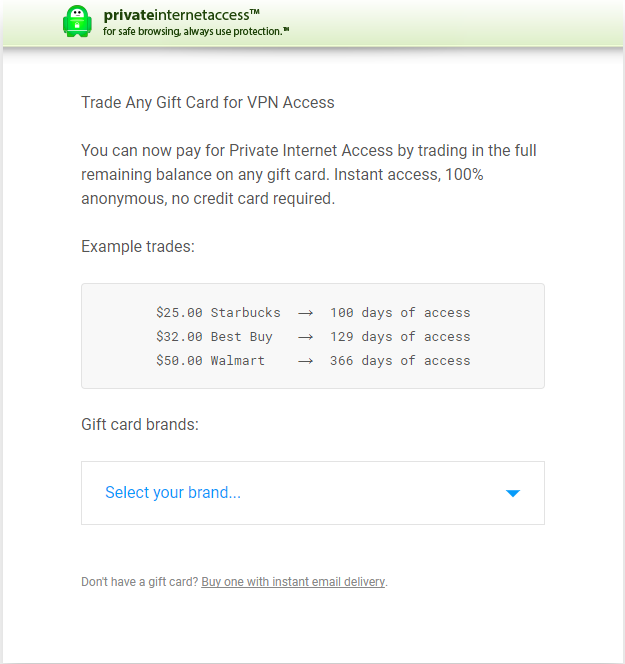
PIA accepts certain store-branded gift cards as payment — no credit card required. However, you still have to provide an email address to receive your credentials. That’s where Mailinator comes in.
Mailinator is a publicly-accessible, receive-only, disposable email service. We’ll have PIA send your credentials there — a layer of separation between you and the VPN provider.
Step by Step
- Pick up a store-branded gift card from the dropdown on PIA’s payment page.
-
Register the card using the same link.
-
When asked for your email address, open a new tab and go to mailinator.com.

-
Create a long email name — I use four random words strung together. Click Go!
-
If there’s existing mail in that inbox, add more words until you find an empty one.
-
Speed matters here. Give PIA that Mailinator address and submit.
-
Watch your Mailinator inbox for 3 emails from PIA. Copy your username and password, then delete the emails. These inboxes are public — less time available, the better.
-
Download the PIA app for your platform, plug in the credentials, and connect.
That’s it. You have a VPN and you’ve submitted no personal information whatsoever.
Caveats
This doesn’t work in bulk. One or two accounts a day seems fine, but running several in a short window appears to trigger their fraud prevention.